My Dell Axim X30 is getting even more useful these days thanks to the free RSS Reader pRSSReader
When I had my Palm, I used to sync RSS feeds to using Sunrise (on Desktop) and Plucker (on Palm) However, now pRSSReader allows me to take advantage of the built-in Wifi on X30 to download directly to the PDA.
Two useful tips:
1) To download the web page linked to the news item for offline viewing, simple choose your feed from Site Manager, then choose File->Properties. Choose the "Caching" tab and check "Cache content for offline browsing" box.
2) To download podcast, again, choose your feed from Site Manager, then choose File->Properties. Choose the "Caching" tab and check "Automatically cache enclosures" box
Showing posts with label pda. Show all posts
Showing posts with label pda. Show all posts
Monday, June 04, 2007
Tuesday, March 13, 2007
Review: Dell Axim X30 Pocket PC PDA
I've been pushing the limit of my PDAs since the early days of Win CE with a Cassiopeia and Palm OS with a Handspring Visor. However, the last "advanced" PDA I used was Zire 72 (built-in 1.3 MP video camera and bluetooth for mobile e-mail and web browsing) After switching to an Abacus WristPDA, the only functions I really used are address book and reading novel. Basically I've given up on using PDA as a PC replacement.
What got me curious about the current state of PDA again was Nokia's new PDA-like Internet Tablet N800. Based on open source OS (linux) and platform (Maemo), it has got quite a few positive reviews. However, the high price tag ($399) made me look for a cheaper alternative on eBay and I bought this Dell Axim X30.
So, what functionality am I looking for this time around and how well does it perform?
1) Watch live TV: X30 is one of the supported (and cheapest) device for Sling Player, the client for watching TV streamed from Slingbox through internet/intranet, and in my case, mostly 802.11b Wifi. I can't expect great quality on such a small screen and relatively slow connection. To me, it is good enough and I'm willing to sacrifice quality for portability. The Pocket PC version of Sling Player costs me $30 though.
2) Watch downloaded video: The free software TCPMP does a pretty good job. It handles most popular formats except RMVB. I wish it won't pause when I touch the screen accidentally but I work around it with a hard case.
3) Read downloaded website: I simple use HTTrack on my PC to download websites to my SD card and use Pocket Internet Explorer on the Axim to read them. It would have been more convienient if I could mount the Pocket PC to Windows as a letter drive but I could live with this.
4) Read downloaded website in Chinese: what good does a PDA do if I can't read Chinese newspaper with it? Even my WristPDA could do that! So I installed CEStar on the Axim. So far so good. I have seen lots of recommendation of Monster Chinese over CEStar but I haven't tried it.
5) Read e-book: I have some Chinese (Big5) e-books in Palm's .prc format. CEBook is the only one that works with them.
6) Internet access: I'm happy with its versatility. I used these 3 modes extensively:
- Wifi (802.11b),
- Bluetooth-enabled cellphone as dial-up modem
- when you maintain an ActiveSync connnection (thru Bluetooth or USB) between a Pocket PC and a PC that is connected to the internet, the Pocket PC could access internet as well.
Surfing the web is not that fast. Pocket Internet Explorer might have something to do with it but my expectation is low to begin with. Also, I found a bug with surfing thru Bluetooth ActiveSync on PIE, it is unable to load pages after a while. I had to disconnect and reconnect. This is rather annoying.
7) E-mail: a client is built-in. It supports the popular protocols like POP3 and IMAP4. I found out Yahoo serves @yahoo.com e-mail thru IMAP4 for free. Simply install Yahoo Go and it will configure for you. It has been working fine for 2 weeks but incoming traffic has stopped for 3 days for some unknown reason. Maybe I've jinxed it :(
8) Note taking: I hand-write notes using the "Writing" view in Pocket Word. I've also tried the highly praised notetaking software PhatPad (costs ~$30-40) but I ended up not buying it. The problem is not with the software though. The screen is just so small that even PhatPad couldn't improve the notetaking experience much.
9) VOIP/IM: Skype is supported on this version of Pocket PC (2003). The voice quality is not bad.
[Extra credit] Listen to music through Bluetooth A2DP: It is not officially supported by Dell but HP iPAQ's driver is supposed to work. I'm able to listen through my Plantronics 590 headphone but the video played by TCPMP became choppy in this mode. I suspect the A2DP code eats up too much resource. So I ended up not using it.
Accessories
- PDAir Aluminum Case: I want a hard case with belt clip. The first one I found was from Innopocket and the reviews at Aximsite are not great. This PDAir case is recommended over it. I don't think it is that great either:
1) when I closed the case, the cover (or the top piece?) got "stucked" in the side of the bottom piece and it is hard to get it out. To make it worse, I lose some of the Neoprene lining in the process of getting the cover out.
2) The belt clip is attached to the case thru a screw and relies on friction to keep it attached. It came loose and dropped my Axim to the floor twice in 2 weeks already.
3) the PDA gets in the way often when it is clipped to the belt. It's not the fault of the case though. That's the nature of belt clip.
- Energy Leaf Extended Battery (1800mAh): the original battery won't last more than 2 hours with Sling Player on non-stop. This extended battery came in a combo deal with the PDAir case and it stole the show.
- St. Tropez Petite: a nice looking stylus pen combo
Alternatives
Would I be better off buying a Nokia N800 instead? I'm not sure. On one hand, it has lots of free (as in speech and beer) software and an enthusiastic community behind it. For example, the note taking software Xournal is available on N800 (BTW, before I bought the Axim, Xournal wasn't compatible with N800. Looks like it has been patched and hopefully the bugs were fixed) The larger screen (800 x 480) should help too. On the other hand, it is still Linux. Things like enabling Chinese is still harder than it should be. Also, I doubt Sling Player will be ported to it ever. So your best bet for live TV would be encoding and streaming from a PC thru other Open Source server/client combo.
Final words
Was it a good buy? Well, I bought it second hand so it costed less than my Zire 72. It does a somewhat better job with web browsing and multimedia than the Zire, thanks to the built-in Wifi and a faster processor. The bottom line is: I had enough prior experience with Pocket PC/Windows Mobile so my expectation is quite low. The Axim is on par.
What got me curious about the current state of PDA again was Nokia's new PDA-like Internet Tablet N800. Based on open source OS (linux) and platform (Maemo), it has got quite a few positive reviews. However, the high price tag ($399) made me look for a cheaper alternative on eBay and I bought this Dell Axim X30.
So, what functionality am I looking for this time around and how well does it perform?
1) Watch live TV: X30 is one of the supported (and cheapest) device for Sling Player, the client for watching TV streamed from Slingbox through internet/intranet, and in my case, mostly 802.11b Wifi. I can't expect great quality on such a small screen and relatively slow connection. To me, it is good enough and I'm willing to sacrifice quality for portability. The Pocket PC version of Sling Player costs me $30 though.
2) Watch downloaded video: The free software TCPMP does a pretty good job. It handles most popular formats except RMVB. I wish it won't pause when I touch the screen accidentally but I work around it with a hard case.
3) Read downloaded website: I simple use HTTrack on my PC to download websites to my SD card and use Pocket Internet Explorer on the Axim to read them. It would have been more convienient if I could mount the Pocket PC to Windows as a letter drive but I could live with this.
4) Read downloaded website in Chinese: what good does a PDA do if I can't read Chinese newspaper with it? Even my WristPDA could do that! So I installed CEStar on the Axim. So far so good. I have seen lots of recommendation of Monster Chinese over CEStar but I haven't tried it.
5) Read e-book: I have some Chinese (Big5) e-books in Palm's .prc format. CEBook is the only one that works with them.
6) Internet access: I'm happy with its versatility. I used these 3 modes extensively:
- Wifi (802.11b),
- Bluetooth-enabled cellphone as dial-up modem
- when you maintain an ActiveSync connnection (thru Bluetooth or USB) between a Pocket PC and a PC that is connected to the internet, the Pocket PC could access internet as well.
Surfing the web is not that fast. Pocket Internet Explorer might have something to do with it but my expectation is low to begin with. Also, I found a bug with surfing thru Bluetooth ActiveSync on PIE, it is unable to load pages after a while. I had to disconnect and reconnect. This is rather annoying.
7) E-mail: a client is built-in. It supports the popular protocols like POP3 and IMAP4. I found out Yahoo serves @yahoo.com e-mail thru IMAP4 for free. Simply install Yahoo Go and it will configure for you. It has been working fine for 2 weeks but incoming traffic has stopped for 3 days for some unknown reason. Maybe I've jinxed it :(
8) Note taking: I hand-write notes using the "Writing" view in Pocket Word. I've also tried the highly praised notetaking software PhatPad (costs ~$30-40) but I ended up not buying it. The problem is not with the software though. The screen is just so small that even PhatPad couldn't improve the notetaking experience much.
9) VOIP/IM: Skype is supported on this version of Pocket PC (2003). The voice quality is not bad.
[Extra credit] Listen to music through Bluetooth A2DP: It is not officially supported by Dell but HP iPAQ's driver is supposed to work. I'm able to listen through my Plantronics 590 headphone but the video played by TCPMP became choppy in this mode. I suspect the A2DP code eats up too much resource. So I ended up not using it.
Accessories
- PDAir Aluminum Case: I want a hard case with belt clip. The first one I found was from Innopocket and the reviews at Aximsite are not great. This PDAir case is recommended over it. I don't think it is that great either:
1) when I closed the case, the cover (or the top piece?) got "stucked" in the side of the bottom piece and it is hard to get it out. To make it worse, I lose some of the Neoprene lining in the process of getting the cover out.
2) The belt clip is attached to the case thru a screw and relies on friction to keep it attached. It came loose and dropped my Axim to the floor twice in 2 weeks already.
3) the PDA gets in the way often when it is clipped to the belt. It's not the fault of the case though. That's the nature of belt clip.
- Energy Leaf Extended Battery (1800mAh): the original battery won't last more than 2 hours with Sling Player on non-stop. This extended battery came in a combo deal with the PDAir case and it stole the show.
- St. Tropez Petite: a nice looking stylus pen combo
Alternatives
Would I be better off buying a Nokia N800 instead? I'm not sure. On one hand, it has lots of free (as in speech and beer) software and an enthusiastic community behind it. For example, the note taking software Xournal is available on N800 (BTW, before I bought the Axim, Xournal wasn't compatible with N800. Looks like it has been patched and hopefully the bugs were fixed) The larger screen (800 x 480) should help too. On the other hand, it is still Linux. Things like enabling Chinese is still harder than it should be. Also, I doubt Sling Player will be ported to it ever. So your best bet for live TV would be encoding and streaming from a PC thru other Open Source server/client combo.
Final words
Was it a good buy? Well, I bought it second hand so it costed less than my Zire 72. It does a somewhat better job with web browsing and multimedia than the Zire, thanks to the built-in Wifi and a faster processor. The bottom line is: I had enough prior experience with Pocket PC/Windows Mobile so my expectation is quite low. The Axim is on par.
Friday, February 23, 2007
Outlook import workaround
My previous post "My X'mas Present" inspired me to write more "tech support" related post. Hopefully this is going to drive more traffic to my blog >:)
I'd like to share with the public a solution to this Outlook 2002 import problem I ran into: when I imported my address book from Outlook Express to Outlook 2002 following this instruction, all my entries appears as last name followed by first name with no space in between, for example, "GatesWilliam", which just look strange! I'd prefer "Gates, William" instead. (BTW, importing from CSV file has the same problem too)
And my search for this solution wasted 3 hours of my precious time :( Apparently it is not a very common problem. (Or people just don't care!) Finally I found this USENET news posting, which led me to the workaround. It is based on VBScript but don't worry if you don't write BASIC. All you need to do is cut-and-paste.
Now I'm one happy Outlook Address book owner!
You might wonder why I couldn't just use the Outlook Express Address book and forget about Outlook. Well, it's because my new Pocket PC only sync with Outlook, but not Outlook Express. BTW, this step completed my long overdued personal project: address book consolidation. I no longer have to live with all slightly different and somwhat outdated info in my Palm/Phone/Webmail address books!
I'd like to share with the public a solution to this Outlook 2002 import problem I ran into: when I imported my address book from Outlook Express to Outlook 2002 following this instruction, all my entries appears as last name followed by first name with no space in between, for example, "GatesWilliam", which just look strange! I'd prefer "Gates, William" instead. (BTW, importing from CSV file has the same problem too)
And my search for this solution wasted 3 hours of my precious time :( Apparently it is not a very common problem. (Or people just don't care!) Finally I found this USENET news posting, which led me to the workaround. It is based on VBScript but don't worry if you don't write BASIC. All you need to do is cut-and-paste.
Now I'm one happy Outlook Address book owner!
You might wonder why I couldn't just use the Outlook Express Address book and forget about Outlook. Well, it's because my new Pocket PC only sync with Outlook, but not Outlook Express. BTW, this step completed my long overdued personal project: address book consolidation. I no longer have to live with all slightly different and somwhat outdated info in my Palm/Phone/Webmail address books!
Thursday, May 19, 2005
PDA Nostalgia
This was a topic on my mind while I wasn't able to fall asleep during my vacation last week (as you could see I haven't blogged for a while since I was without internet access)
The chains of thought begun with my wondering about what the new Palm LifeDrive PDA would be like when it releases on 5/18. Then I trace back all PDA I've ever owned: Zire 72, Handspring Visor Prism (the first palm with color screen), Casio Cassiopeia E-110 (the 2nd gen i.e. first usable gen of PDA from Microsoft running Win CE. Also my first PDA, broken after a jam packed elevator ride)
Then I trace back to the 1st PDA in my family: my dad was a true pioneer gadgeteer himself. He bought a Casio Databank more than 15 years ago. He was still using it even though one of the key has stopped responding! Of course I got him a replacement: a brand new Sharp Organizer (with builtin English-Spanish dictionary!)
Then I trace back to the era (early 80s) when handhelds are closer cousins to calculators than organizers. They were called pocket computers and have a small but loyal followings. I could still remember computer magazine in HK having a few columns dedicated to pocket computers and published source code (mostly BASIC, some assembly) for all those primitive games that used character symbols to denote the border of a race track, obstacles in outer space, and monsters... etc. You really need a lot of imagination to enjoy those games! I'd say the graphics on GameBoy and PSP are taking away the capacity of imagination from this generation of kids! I always fancied something like Casio PB-700(which I consider the best from Casio. Casio's FX series also have a few gems) or Sharp PC-1500(Casio's major rival) but I ended up only able to convince my dad to get me a Casio FX-5200P, which has the rare combination of a look of conventional calculator and yet programmable in BASIC!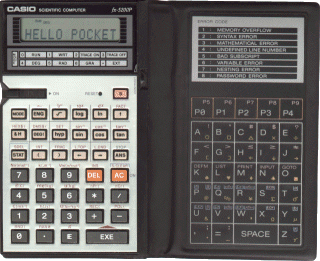
Then I still couldn't fall asleep so I switched to other more boring topics...
And what a coincidence as I come across this great history of PDA article thru Engadget today! Ernst Mulder's Calculator Collection is another great resource.
The chains of thought begun with my wondering about what the new Palm LifeDrive PDA would be like when it releases on 5/18. Then I trace back all PDA I've ever owned: Zire 72, Handspring Visor Prism (the first palm with color screen), Casio Cassiopeia E-110 (the 2nd gen i.e. first usable gen of PDA from Microsoft running Win CE. Also my first PDA, broken after a jam packed elevator ride)
Then I trace back to the 1st PDA in my family: my dad was a true pioneer gadgeteer himself. He bought a Casio Databank more than 15 years ago. He was still using it even though one of the key has stopped responding! Of course I got him a replacement: a brand new Sharp Organizer (with builtin English-Spanish dictionary!)
Then I trace back to the era (early 80s) when handhelds are closer cousins to calculators than organizers. They were called pocket computers and have a small but loyal followings. I could still remember computer magazine in HK having a few columns dedicated to pocket computers and published source code (mostly BASIC, some assembly) for all those primitive games that used character symbols to denote the border of a race track, obstacles in outer space, and monsters... etc. You really need a lot of imagination to enjoy those games! I'd say the graphics on GameBoy and PSP are taking away the capacity of imagination from this generation of kids! I always fancied something like Casio PB-700(which I consider the best from Casio. Casio's FX series also have a few gems) or Sharp PC-1500(Casio's major rival) but I ended up only able to convince my dad to get me a Casio FX-5200P, which has the rare combination of a look of conventional calculator and yet programmable in BASIC!
Then I still couldn't fall asleep so I switched to other more boring topics...
And what a coincidence as I come across this great history of PDA article thru Engadget today! Ernst Mulder's Calculator Collection is another great resource.
Saturday, August 07, 2004
It's a PDA? a laptop? No! It's TUG (THE ultimate gadget)
PDA, checked.
Cell phone, checked.
Laptop, checked.
Digital Camera, checked.
DV, checked.
MP3 player, checked.
That's what any typical gadget freak would do before (s)he goes on a trip. (That's what an Xtreme-freak would do when going to grocery shopping :P)
Wouldn't it be great when some day we could have an ALL-in-one device that combined the functionalities of all of the above? That's what I'd call the Universal Gadget (TUG), or THE ultimate gadget :D.
THE industry calls this convergence. Right now we have seen:
- PDA x Cell phone x Camera x MP3, e.g. Treo 600
- Laptop x Camera x MP3, e.g. Sony VAIO TR-series
- DC x DV, e.g. a lot of DV could take megapixel+ (up to 3.3) still these day
- DC x DV x MP3, e.g. Panasonic D-Snap SV-AV50S
etc.
Unfortunately, you need to sacrifice a lot of quality/performance on some (or ALL) functions in any multi-fuctional units. Not to mention a lot of money too!
I believe a TUG, with reasonable quality/performance in ALL areas, will appear in the next few years. Here is my minimum requirement/spec:
- 3 Megapixel camera
- 10x optical zoom
- Over megapixel CCD sensor for video
- record directly to HD in DV format (not mpeg2! don't want inter-frame dependency!)
- 80 Gb HD (enough for a couple hours of DV, music, still photo, movies for entertainment, games, combined. Oh yeah, the OS and PIM app too)
- 7" tablet-type screen. (No integrated keyboard)
- Running the same version of OS as my desktop with instant-on capability
- Integrated messenger application that combines voice mail/email/SMS/MMS/voice call/IM/video call in a seemless fashion.
- ability to connect to 3G phone network
- WIFI and auto-switch to 3G phone network when WIFI is unavailable.
- 6 full hour of battery life (per battery) with WIFI and bluetooth on.
- less than 3 lbs.
Periphreal for the UG would include:
- Blu-ray optical read-write drive with 13+ Gb capacity on single disk (in case I fill up the 80Gb during my trip)
- Bluetooth stereo (or multi-channel :P) headphone + mic
It would look like this (but less thick and bigger screen):

(Yeah, it's a Sharp ViewCam)
Alright, enough day dreaming!
Cell phone, checked.
Laptop, checked.
Digital Camera, checked.
DV, checked.
MP3 player, checked.
That's what any typical gadget freak would do before (s)he goes on a trip. (That's what an Xtreme-freak would do when going to grocery shopping :P)
Wouldn't it be great when some day we could have an ALL-in-one device that combined the functionalities of all of the above? That's what I'd call the Universal Gadget (TUG), or THE ultimate gadget :D.
THE industry calls this convergence. Right now we have seen:
- PDA x Cell phone x Camera x MP3, e.g. Treo 600
- Laptop x Camera x MP3, e.g. Sony VAIO TR-series
- DC x DV, e.g. a lot of DV could take megapixel+ (up to 3.3) still these day
- DC x DV x MP3, e.g. Panasonic D-Snap SV-AV50S
etc.
Unfortunately, you need to sacrifice a lot of quality/performance on some (or ALL) functions in any multi-fuctional units. Not to mention a lot of money too!
I believe a TUG, with reasonable quality/performance in ALL areas, will appear in the next few years. Here is my minimum requirement/spec:
- 3 Megapixel camera
- 10x optical zoom
- Over megapixel CCD sensor for video
- record directly to HD in DV format (not mpeg2! don't want inter-frame dependency!)
- 80 Gb HD (enough for a couple hours of DV, music, still photo, movies for entertainment, games, combined. Oh yeah, the OS and PIM app too)
- 7" tablet-type screen. (No integrated keyboard)
- Running the same version of OS as my desktop with instant-on capability
- Integrated messenger application that combines voice mail/email/SMS/MMS/voice call/IM/video call in a seemless fashion.
- ability to connect to 3G phone network
- WIFI and auto-switch to 3G phone network when WIFI is unavailable.
- 6 full hour of battery life (per battery) with WIFI and bluetooth on.
- less than 3 lbs.
Periphreal for the UG would include:
- Blu-ray optical read-write drive with 13+ Gb capacity on single disk (in case I fill up the 80Gb during my trip)
- Bluetooth stereo (or multi-channel :P) headphone + mic
It would look like this (but less thick and bigger screen):
(Yeah, it's a Sharp ViewCam)
Alright, enough day dreaming!
Subscribe to:
Posts (Atom)